
Introduction
When the RTX 4090 launched, one of the biggest concerns was not performance. It was the power connector.
Some RTX 4090 cards suffered from melted 12VHPWR connectors, damaged cables, burnt sockets, and in some cases serious board-level damage. For a graphics card that costs a lot of money, that made many buyers nervous and rightly so.
Now with the RTX 5090 and the new RTX 50-series, the question is simple:
Did NVIDIA fix the power connector problem, or should buyers still be careful?
The short answer: the connector design has improved, but installation quality still matters. A high-power GPU can still be damaged if the cable is not seated correctly, bent too sharply, or paired with the wrong power supply/cable setup.
This guide explains what changed, what still matters, and when you should get your GPU checked.
Why RTX 4090 Power Connectors Melted
The RTX 4090 used the 12VHPWR power connector, a compact high-power connector designed to replace multiple traditional 8-pin PCIe connectors.
The problem was not always the connector alone. In many reported cases, the risk increased when:
- The connector was not fully inserted.
- The cable was bent too close to the socket.
- The adapter cable was under side pressure.
- The cable was pulled or twisted after installation.
- The case had poor clearance near the side panel.
- The connector became slightly loose over time.
A partially inserted high-power connector can create resistance. Resistance creates heat. With enough current, that heat can damage the plastic housing, cable terminals, and GPU-side socket.
For users, this was worrying because the failure could look sudden:
- Burning smell
- Blackened connector
- Melted plastic
- GPU shutting down
- No display
- Visible damage around the power socket
Once the socket or PCB area is damaged, this is no longer a simple cable issue. The card needs proper inspection.
What Changed With RTX 5090 and 12V-2×6?
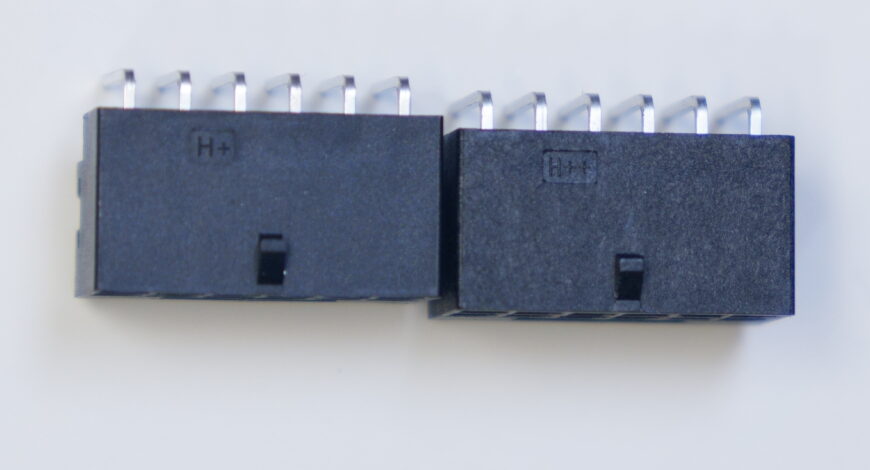
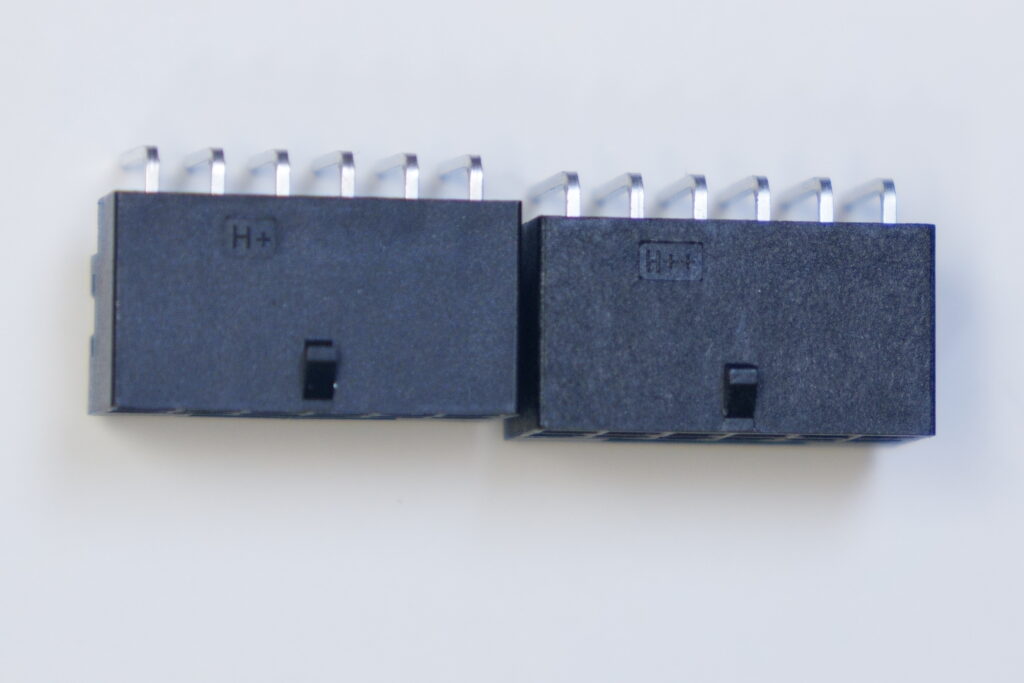
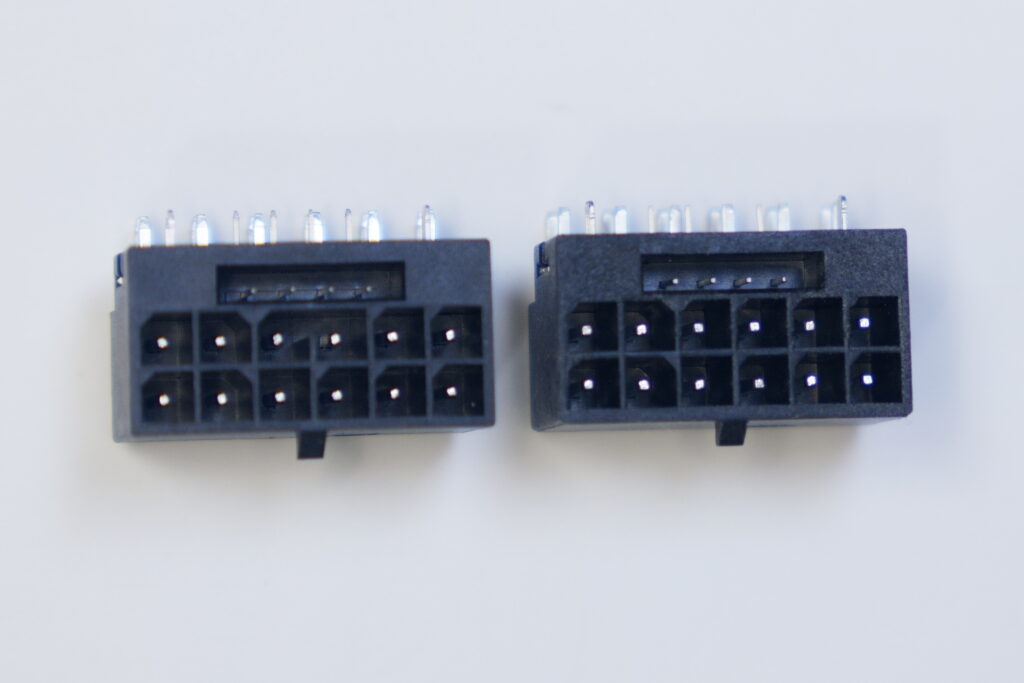
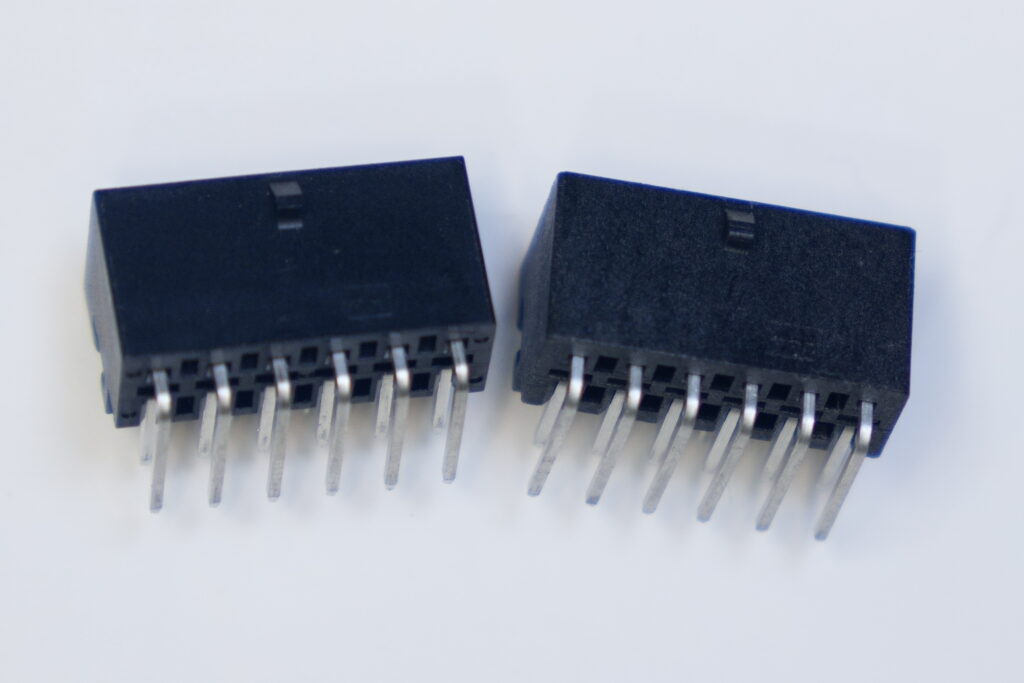
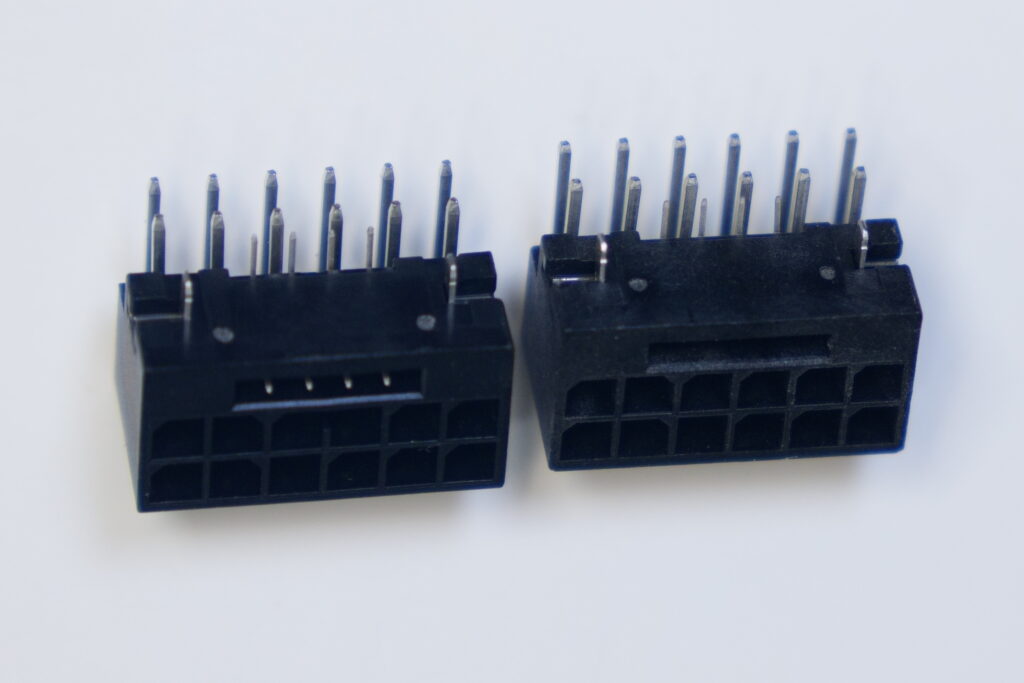
The RTX 4090 generation commonly used the original 12VHPWR connector. In board-level repair circles, many of these RTX 4090 connector assemblies are referred to as H+ connectors.
The RTX 50-series, including the RTX 5090, moves to the revised 12VHPWR connector design. The upgraded connector is commonly referred to as H++.
Both connector families are part of the same 16-pin high-power GPU connector idea:
- 12 large power contacts carry the main 12V current.
- 4 smaller sense/control pins tell the GPU what power level the cable/PSU can safely support.
- The connector family is designed for high-power GPUs, with configurations up to 600W when correctly implemented by the card, cable, and PSU.
The important change is not just the name. The revised 12VHPWR / H++ design changes the pin engagement behavior. The high-current contacts and sense pins are arranged so the connector is more likely to behave safely if the plug is not fully seated. In practical terms, the design is intended to reduce the risk of a GPU pulling high power through a poorly inserted connector.
The key improvement is this:
H++ / 12VHPWR is designed to be more tolerant of incomplete insertion than the older H+ / 12VHPWR connector.
That does not mean the connector is impossible to damage. It means the standard was revised because the earlier design had a real-world weakness.
For a high-end card like the RTX 5090, users should still treat the power connection seriously. More power means less room for sloppy installation.
H+ vs H++ Connector: Practical Difference
For customers, the important difference is simple:
| Connector | Common use | Practical meaning |
|---|---|---|
| H+ / 12VHPWR | Common on RTX 4090 generation cards | Works when installed correctly, but became known for connector-melting cases when not fully seated or stressed |
| H++ / 12VHPWR | Upgraded connector used on newer high-power GPUs such as RTX 5090 generation cards | Revised design intended to improve safety and reduce incomplete-insertion risk |
The older H+ connector can still work properly if installed correctly. The problem is that real PC builds are not perfect. Large GPUs, tight cases, side-panel pressure, adapter cables, and sharp cable bends all increase the chance of a bad connection.
The H++ connector does not remove the need for good installation, but it is the better connector revision for high-power GPU use.
Does This Mean RTX 5090 Connectors Are Safe Now?
They should be safer than the first RTX 4090 connector setups, but “safer” does not mean “ignore installation.”
The connector can still be put under stress if:
- The side panel pushes against the cable.
- The cable bends sharply immediately after the connector.
- The user forces the cable into a tight case.
- A poor-quality adapter or extension cable is used.
- The wrong PSU cable is mixed with a modular power supply.
- The connector is not checked after installation.
A GPU power connector is not just a plug. On cards like the RTX 4090 and RTX 5090, it carries a serious amount of current. Small contact problems can become heat problems.
If you are buying an RTX 5090, especially for a compact case, you should plan the cable route before closing the side panel.
Safe RTX 5090 Installation Checklist
Before powering on an RTX 5090, check the following:
1. Make sure the connector is fully seated
Push the cable in firmly and evenly until it is completely inserted. There should be no visible gap between the connector and the GPU socket.
Do not assume it is connected just because it clicked lightly. Visually inspect it.
2. Avoid sharp bends near the connector
Do not bend the cable immediately at the socket. Give the cable some straight clearance before it curves.
If the side panel presses hard against the cable, the case may not have enough room for that GPU/cable setup.
3. Use the correct PSU cable
If your power supply has a native 12VHPWR or cable, use the official cable supplied for that exact PSU model.
Do not mix modular PSU cables from different brands or different PSU models. Modular PSU cables can look similar but have different pinouts. Using the wrong cable can kill hardware.
4. Avoid cheap extensions and unknown adapters
Aesthetic cable extensions can look nice, but they add another connection point. For high-power GPUs, every extra connector is another possible failure point.
If you must use an adapter or extension, use a high-quality one from a known brand and inspect it regularly.
5. Re-check after closing the case
Many problems happen when the cable is seated properly at first, but the side panel or cable pressure shifts it slightly.
After closing the case, look again if possible. Make sure the cable did not move.
Warning Signs of Power Connector Trouble
Stop using the GPU and inspect it if you notice:
- Burning smell near the graphics card
- Discoloration around the power connector
- Melted or softened plastic
- Random shutdowns under gaming/load
- Display cuts out during heavy GPU usage
- Connector feels unusually hot
- Cable looks loose or angled
- PC shuts down when the GPU boosts
Do not keep stress-testing the card if you suspect connector damage. More current through a bad connection can make the damage worse.
GPU Solutions Expert Note
From a repair point of view, power connector damage should not be treated casually.
A burnt connector may only be the visible part of the problem. The card may also have:
- Damaged GPU-side socket
- Heat damage around solder joints
- Burnt PCB pads
- Shorted power rail
- Damaged power stages
- Previous repair damage from bad connector replacement
At GPU Solutions, when RTX 4090 cards come in for power connector replacement, we are now replacing the older H+ connector with the upgraded H++ connector instead of fitting the same older revision again.
The reason is simple: if the connector has already failed, the repair should not just make the card work again — it should also reduce the chance of the same connector weakness returning. The H++ connector is the better revision for this high-power application.
This does not mean every melted connector repair is simple. Sometimes only the connector is damaged. Sometimes the PCB pads, nearby components, or power rail have also been affected. A proper inspection is required before confirming the repair path.
For expensive GPUs like the RTX 4090 or RTX 5090, a proper diagnosis is worth doing before assuming the card is dead.
Should You Avoid the RTX 5090 Because of the Connector?
No, not automatically.
The RTX 5090 is a high-end GPU and the connector standard has improved compared with the original RTX 4090 launch situation. But buyers should respect the power requirements.
You should be extra careful if:
- Your case has limited side-panel clearance.
- You plan to use cable extensions.
- Your PSU is older.
- You are buying a used RTX 5090 later.
- The card was previously installed in a tight case.
- You see any discoloration around the connector.
If installed correctly with the right PSU and cable clearance, the risk should be much lower. But careless installation can still cause expensive damage.
Used RTX 4090 and RTX 5090 Buyers: Check This First
If you are buying a used high-end GPU, inspect the power connector before paying.
Look for:
- Brown or black marks inside the socket
- Melted plastic edges
- Loose pins
- Scratched or replaced connector housing
- Uneven connector fit
- Seller avoiding close-up photos
- Card advertised as “tested” but no load test proof
A GPU can still power on with early connector damage. That does not mean it is safe long-term.
For used RTX 4090 cards especially, connector inspection should be part of the buying process.
When You Should Get the GPU Checked
You should get the GPU inspected if:
- The connector or cable has any burn marks.
- The GPU lost display during gaming or rendering.
- The connector smells burnt.
- The cable melted or became stuck.
- The PC shuts down under load.
- The card was used with a questionable adapter.
- You bought a used RTX 4090/5090 and want peace of mind.
A visual check is helpful, but it is not always enough. Some power faults require board-level testing.
Conclusion
The RTX 5090 power connector situation should be better than the early RTX 4090 12VHPWR problems, thanks to the revised 12VHPWR connector standard.
But the basic rule has not changed:
High-power GPUs need careful installation.
Use the correct PSU cable, fully seat the connector, avoid sharp bends, and do not force the cable into a tight case. If you see signs of heat or connector damage, stop using the card and get it inspected before the damage spreads.
For expensive GPUs, prevention is cheaper than repair.
FAQ
Is the RTX 5090 connector different from the RTX 4090 connector?
Yes. The RTX 4090 generation commonly used the older H+ / 12VHPWR connector. The RTX 5090 generation uses the newer H++ / 12VHPWR connector design, which was revised to improve safety compared with the original 12VHPWR implementation.
What is the difference between H+ and H++ GPU connectors?
H+ refers to the older 12VHPWR-style connector commonly seen on RTX 4090 generation cards. H++ refers to the upgraded 12VHPWR connector revision. Both are 16-pin high-power GPU connectors, but H++ has revised pin engagement behavior intended to reduce incomplete-insertion risk.
Can GPU Solutions replace an RTX 4090 H+ connector with H++?
Yes. For RTX 4090 cards coming in for connector replacement, GPU Solutions is now replacing the older H+ connector with the upgraded H++ connector instead of fitting the same older revision again. The card still needs inspection first, because connector damage can also affect PCB pads and power circuitry.
Can an RTX 5090 power connector still melt?
The newer connector should reduce risk, but any high-power connector can still overheat if it is not fully seated, sharply bent, stressed by the case panel, or used with poor-quality adapters.
Should I use a cable extension with an RTX 5090?
For high-power GPUs, it is safer to use the official PSU cable where possible. Extensions add another connection point and can increase risk if they are low quality or poorly installed.
What should I do if my RTX 4090 connector is burnt?
Stop using the card immediately. Do not keep testing it under load. The GPU should be inspected for connector damage, PCB damage, and power rail faults.
Can a melted GPU power connector be repaired?
Sometimes yes, but it depends on the damage. If only the connector is damaged, replacement may be possible. If the PCB pads, power rail, or surrounding components are damaged, deeper board-level repair may be needed.
Is a used RTX 4090 risky to buy?
It can be a good card, but you should inspect the power connector carefully. Ask for close-up photos of the socket and proof of load testing before buying.
CTA
Need help with a graphics card power connector issue?
GPU Solutions can diagnose and repair many GPU faults including overheating, artifacting, no display, power connector damage, and VRAM-related issues. A proper inspection is required before confirming repairability.
Book a diagnosis here: https://gpusolutions.net/book-device
GPU Solutions FAQ: https://gpusolutions.net/faq
Internal Link Suggestions
- Booking page: https://gpusolutions.net/book-device
- FAQ: https://gpusolutions.net/faq

Recent Comments